


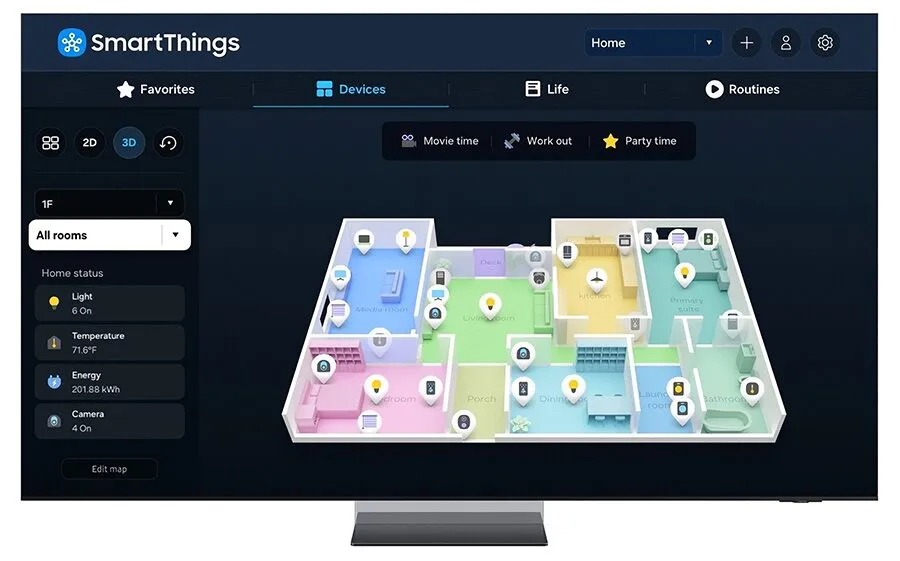
What is SmartThings Map View?
SmartThings Map View is the latest innovative feature from SmartThings, designed to enhance the way you interact with and manage your smart home devices. Map View provides a visual representation of your entire smart home ecosystem, making it easier than ever to monitor, control, and optimize the performance of your connected devices. With this new feature, SmartThings continues to lead the way in smart home innovation, delivering a more intuitive and user-friendly experience.
Why SmartThings Map View Matters
In the ever-growing world of smart home technology, managing multiple devices across different rooms and zones can become complex. SmartThings Map View addresses this challenge by offering:
- Visual Management: See all your devices at a glance on a virtual map of your home, making it easier to locate and manage them.
- Improved Control: Quickly access and control devices directly from the map, streamlining your interaction with your smart home.
- Enhanced Troubleshooting: Identify and resolve issues faster by visually pinpointing problem areas within your network.
How Does SmartThings Map View Work?
SmartThings Map View integrates seamlessly with your existing SmartThings setup, automatically generating a detailed map of your smart home. Here’s how it works:
- Device Mapping: SmartThings scans your network and places devices on a virtual map according to their physical locations in your home.
- Interactive Interface: The map is interactive, allowing you to click on any device to view its status, settings, and control options.
- Real-Time Updates: The map updates in real-time, reflecting any changes or new devices added to your network.
Benefits of SmartThings Map View
Simplified Device Management
Managing multiple smart home devices can be overwhelming. Map View simplifies this by providing a clear, visual overview of your entire network, making it easier to monitor device status and performance.
Intuitive Control
With Map View, controlling your smart home devices is more intuitive. Instead of navigating through lists or menus, you can simply click on a device on the map to access its controls and settings.
Efficient Troubleshooting
Map View helps you quickly identify and address issues. If a device is offline or experiencing problems, its location and status are clearly indicated on the map, allowing for faster troubleshooting and resolution.
Enhanced Organization
Organize your devices by rooms or zones for more efficient management. Map View lets you see how devices are distributed throughout your home, helping you optimize their placement and performance.
SmartThings Map View in Action
Imagine walking into your home and instantly seeing the status of all your devices displayed on a map. You notice a light is on in the living room – a quick tap on the map and you turn it off. You see that the kitchen sensor battery is low – another tap takes you to the settings to check the battery level and order a replacement. Map View makes these interactions seamless and straightforward.
Getting Started with SmartThings Map View
Getting started with Map View is simple:
- Update Your App: Ensure you have the latest version of the SmartThings app installed.
- Enable Map View: Navigate to the Map View option in the app menu and enable it.
- Scan Your Network: Let SmartThings scan your home network to map your devices.
- Explore and Customize: Explore the map, customize device placements, and start managing your smart home with ease.
Conclusion
SmartThings Map View is a game-changer for smart home enthusiasts, offering a more intuitive and efficient way to manage and control your devices. By providing a visual representation of your smart home, Map View enhances your ability to monitor, troubleshoot, and optimize your connected ecosystem. Embrace the future of smart home management with SmartThings Map View and experience a new level of convenience and control.